Real Master Bus
Apply output gain or mute the live program at the actual master bus—not as a cosmetic control.
Professional macOS broadcasting
TRAKCAST brings your live audio, metadata, artwork, overlays, and broadcast history into one focused control surface—built for radio DJs on Apple Silicon.
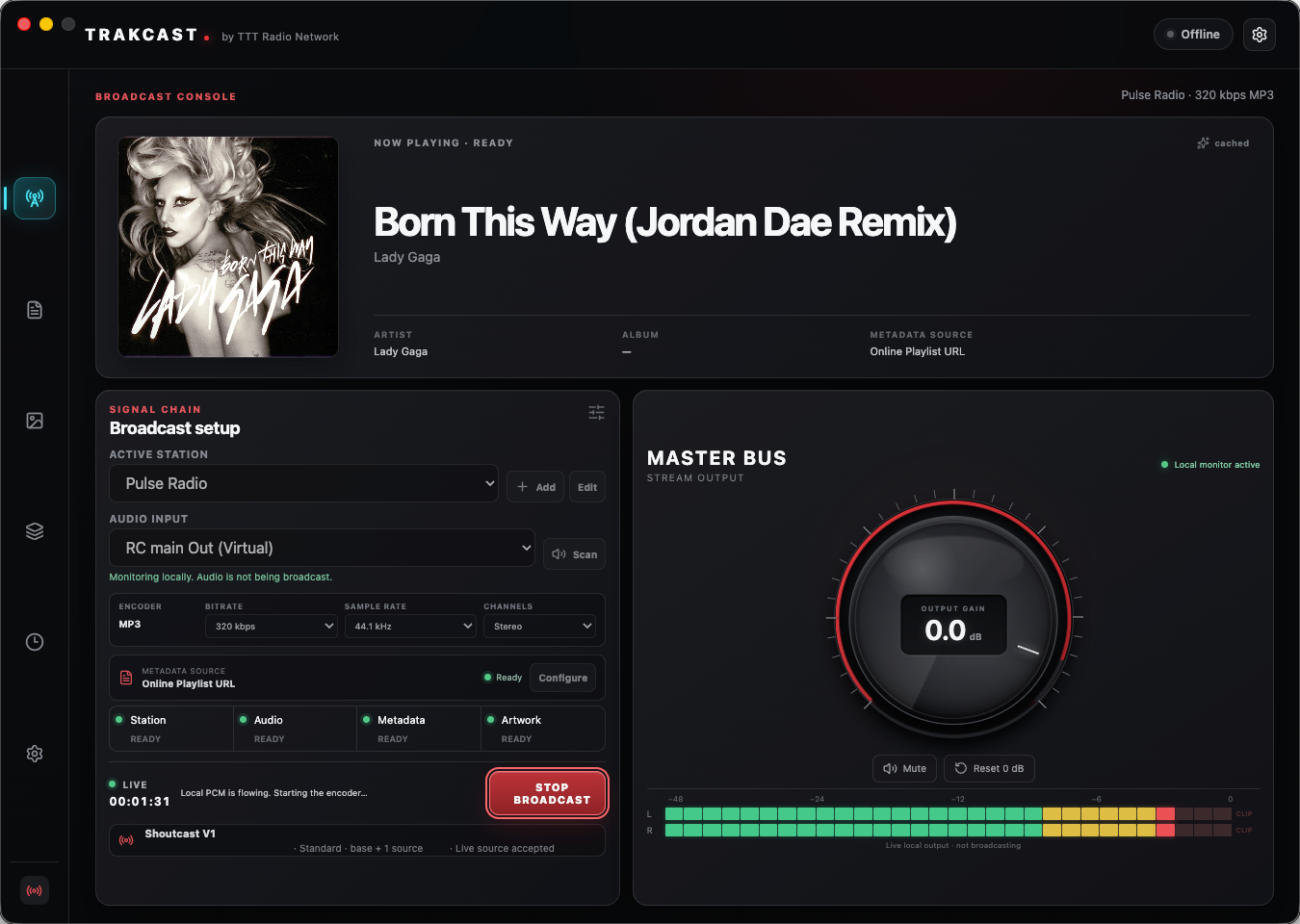
One broadcast surface
TRAKCAST is an internet radio encoder for macOS designed around what happens during a real show: capturing the right device, taking over cleanly, delivering stable MP3 audio, and restoring AutoDJ when you are done.
Apply output gain or mute the live program at the actual master bus—not as a cosmetic control.
Scan macOS audio devices, select the intended source, and read responsive stereo levels before going live.
Send MP3 using supported bitrate, sample-rate, and channel choices. Shoutcast v1 is the verified beta path.
Monitor a public Serato Live Playlist URL, resolve album art through configured providers, and retain a local history.
Serve now-playing visuals from a loopback-only local web server for capture in OBS—no public overlay host needed.
Take over the live source with visibility into the transition, then restore automated playback when the session ends.
Supported workflow
A clear signal path keeps the show understandable under pressure. TRAKCAST coordinates the steps; your configured services remain in your control.
Local by design
Station profiles and history remain on your Mac. Credentials use macOS/Electron secure storage. The OBS server binds to loopback. There are no TRAKCAST accounts, advertising, analytics, or behavioral trackers in this initial release.
For M1, M2, M3, and M4 Macs. Updates are manual during beta.
FAQ
The beta is verified for Shoutcast v1. The application contains a Shoutcast v2 foundation, but v2 is not presented as production-ready yet.
TRAKCAST monitors a configured public Serato Live Playlist URL. It is a URL-based metadata workflow, not a native Serato integration.
Yes. Metadata monitoring, artwork resolution, history, and local OBS overlay output can continue without an active broadcast connection.
No. MusicBrainz, Cover Art Archive, and optional Discogs lookups depend on provider data and configuration. TRAKCAST falls back to its placeholder when a suitable image is unavailable.
The current beta targets Apple Silicon Macs: M1, M2, M3, and M4. Intel Macs and Windows are not supported.